# Visa Giftcard Loading Fees

<span class="TextRun SCXW47265704 BCX0" data-contrast="auto" lang="EN-US" xml:lang="EN-US"><span class="NormalTextRun SCXW47265704 BCX0">Visa prepaid giftcards often have a additional loading fee. POS can't automatically add the loading fee for variable price giftcars (yet) so it's upto the checkout operator to add this fee as a separate product to the transaction. The steps below will show you how to create the product and also how to configure a reminder for the checkout staff.</span></span>

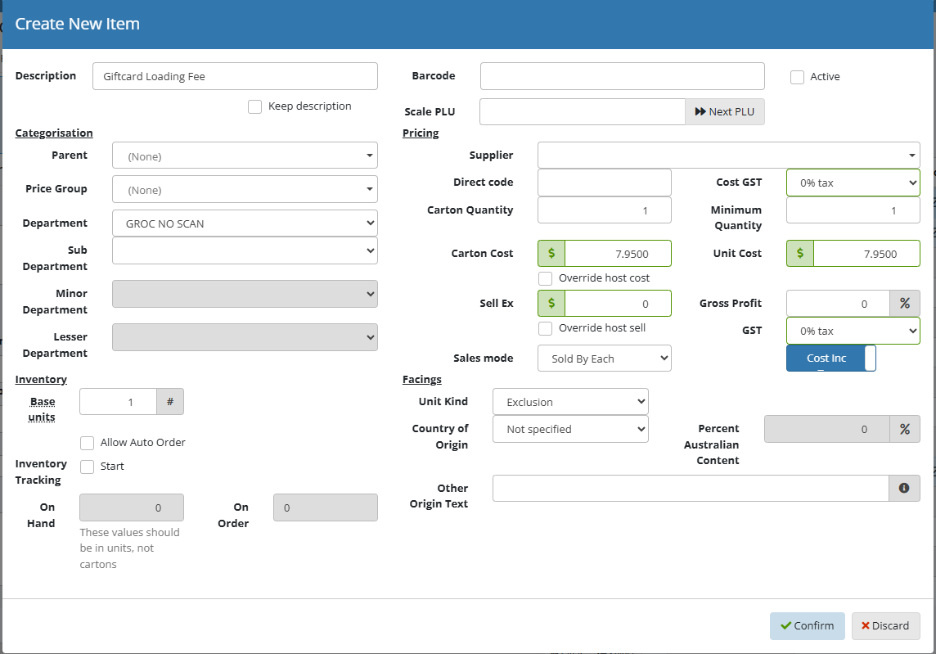
### <span class="TextRun SCXW47265704 BCX0" data-contrast="auto" lang="EN-US" xml:lang="EN-US"><span class="NormalTextRun SCXW47265704 BCX0">Create the Fee Product</span></span>

1. <span class="TextRun SCXW47265704 BCX0" data-contrast="auto" lang="EN-US" xml:lang="EN-US"><span class="NormalTextRun SCXW47265704 BCX0">Open Product Maintenance</span></span>
2. <span class="TextRun SCXW47265704 BCX0" data-contrast="auto" lang="EN-US" xml:lang="EN-US"><span class="NormalTextRun SCXW47265704 BCX0">Click on the Create button</span></span>
3. Fill in the Description, Department/ Sub Department, Active Status, GST and Sell Price.

There are a few ways to sell the product.  
**Flipchart:** Add the product to a flipchart for the checkout staff  
**Barcode:** Add a unique barcode to the product so the checkout staff can either scan or type it in (like a produce item)  
**Product Search:** This is the least efficient way, but still possible for checkout staff.<span class="EOP SCXW47265704 BCX0" data-ccp-props="{}"> </span>

<span class="SCXW47265704 BCX0"><span class="WACImageContainer NoPadding BlobObject SCXW47265704 BCX0" role="presentation">![](https://docs.gapsolutions.com.au/uploads/images/gallery/2025-11/sg9cM6L62ZeGRdh4-embedded-image-2md0zkqq.png)</span></span><span class="EOP SCXW47265704 BCX0" data-ccp-props="{}"> </span>

### <span class="EOP SCXW47265704 BCX0" data-ccp-props="{}">Setup Popup Message Reminder</span>

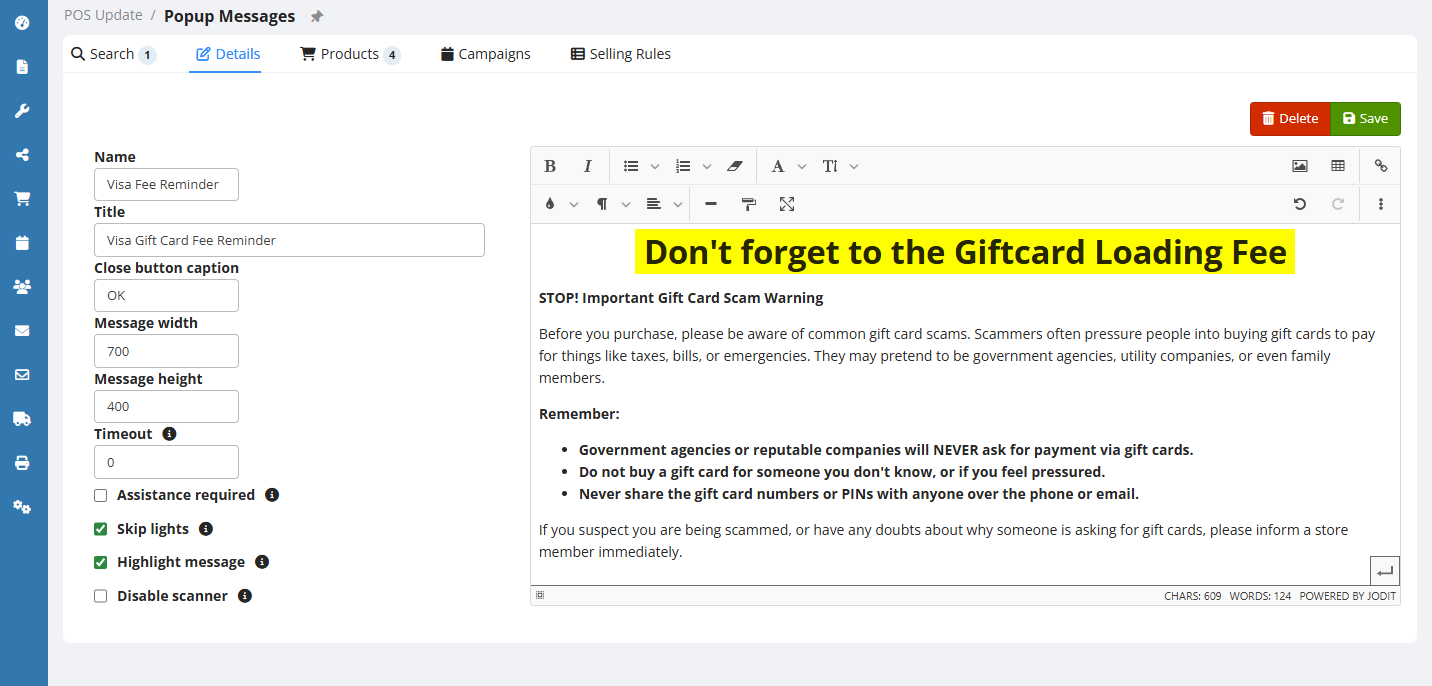
1. <span class="EOP SCXW47265704 BCX0" data-ccp-props="{"335559685":0}">Open POS Update &gt; Popup Messages</span>
2. <span class="EOP SCXW47265704 BCX0" data-ccp-props="{"335559685":0}">Click the Add button to add a new message</span>
3. <span class="EOP SCXW47265704 BCX0" data-ccp-props="{"335559685":0}">Fill in the Details, an example is below and click Save</span>
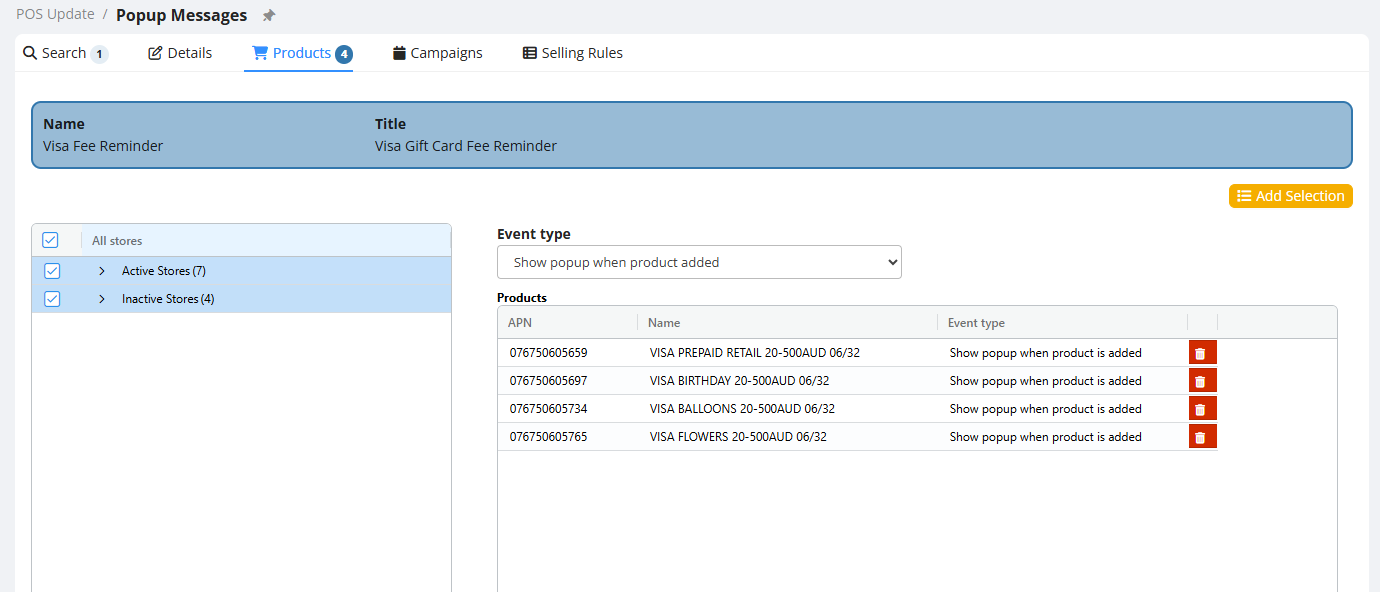
4. <span class="EOP SCXW47265704 BCX0" data-ccp-props="{"335559685":0}">Go to the Products Page</span>
5. <span class="EOP SCXW47265704 BCX0" data-ccp-props="{"335559685":0}">Change the Event Type to "Show popup when product added"</span>
6. <span class="EOP SCXW47265704 BCX0" data-ccp-props="{"335559685":0}">Click the Add Selection</span>
7. <span class="EOP SCXW47265704 BCX0" data-ccp-props="{"335559685":0}">Search for Visa and add all Visa variable products</span>

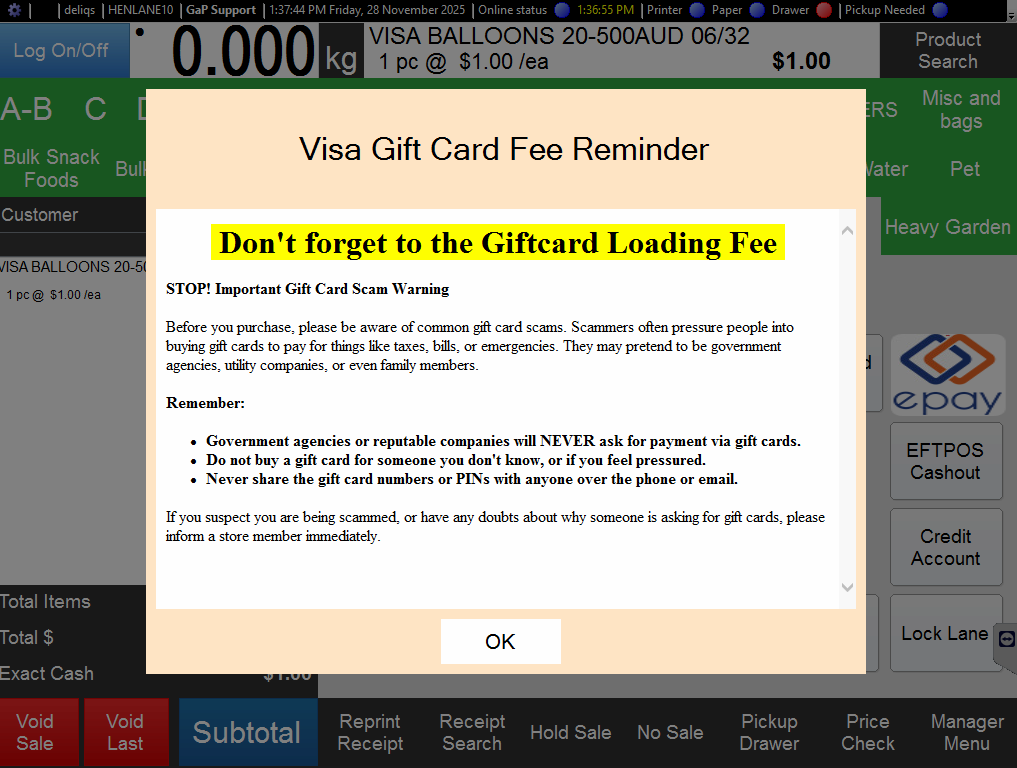
<span class="EOP SCXW47265704 BCX0" data-ccp-props="{"335559685":0}">Here is an example of the text you can use:</span>

> # **Don't forget to the Giftcard Loading Fee** 
> 
> **STOP! Important Gift Card Scam Warning**
> 
> <span class="">Before you purchase,</span><span class=""> please be aware of common gift card scams.</span><span class=""> Scammers often pressure people into buying gift cards to pay for things like taxes,</span><span class=""> bills,</span><span class=""> or emergencies.</span><span class=""> They may pretend to be government agencies,</span><span class=""> utility companies,</span><span class=""> or even family members.</span>
> 
> **Remember:**
> 
> - **Government agencies or reputable companies will NEVER ask for payment via gift cards.**
> - **Do not buy a gift card for someone you don't know, or if you feel pressured.**
> - **Never share the gift card numbers or PINs with anyone over the phone or email.**
> 
> <span class="">If you suspect you are being scammed,</span><span class=""> or have any doubts about why someone is asking for gift cards,</span><span class=""> please inform a store member immediately.</span>

[![Screenshot 2025-11-28 133921.png](https://docs.gapsolutions.com.au/uploads/images/gallery/2025-11/scaled-1680-/e3F3hGKquPBtd92V-screenshot-2025-11-28-133921.png)](https://docs.gapsolutions.com.au/uploads/images/gallery/2025-11/e3F3hGKquPBtd92V-screenshot-2025-11-28-133921.png)

[![Screenshot 2025-11-28 133939.png](https://docs.gapsolutions.com.au/uploads/images/gallery/2025-11/scaled-1680-/eurvtohC5YZO9HLZ-screenshot-2025-11-28-133939.png)](https://docs.gapsolutions.com.au/uploads/images/gallery/2025-11/eurvtohC5YZO9HLZ-screenshot-2025-11-28-133939.png)
<span class="EOP SCXW47265704 BCX0" data-ccp-props="{"335559685":0}"> </span>

[![Screenshot 2025-11-28 133759.png](https://docs.gapsolutions.com.au/uploads/images/gallery/2025-11/scaled-1680-/FI2BbAj7LIUM2fCy-screenshot-2025-11-28-133759.png)](https://docs.gapsolutions.com.au/uploads/images/gallery/2025-11/FI2BbAj7LIUM2fCy-screenshot-2025-11-28-133759.png)

<span class="EOP SCXW47265704 BCX0" data-ccp-props="{"335559685":0}"></span>