
Count Stock (PDE Guide)
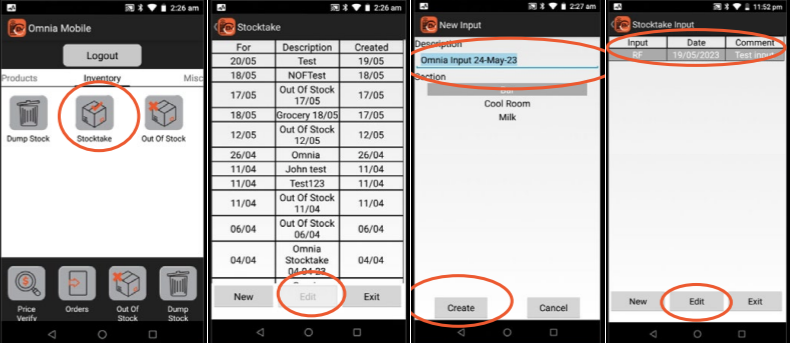
Create an Input
- Login → Inventory → Stocktake
- Select stocktake → Edit
- Create input:
- Name
- Section
Counting Process
- Scan product
- Enter quantity
- Press Add
Optional:
- Scan location before product
Important Rules
- Always press Add on final item
- Do not double count areas
- Ensure correct section is selected
Reviewing Counts
- Press back
- Review scanned items
- Edit if needed
Common Issues
-
- Missing last item (forgot to press Add)
- Incorrect quantities entered
- Wrong section used
No Comments